 Native module
 Know the moment a Make scenario goes quiet.
Make tells you when a module throws an error. It stays silent when a scenario gets switched off, a connection expires, or a trigger stops firing. Checkilo is the alarm for that silence, added as a native module in your scenario.
What Make's history misses
An error means it ran. Silence means it never started.
Make runs the scenario; Checkilo watches every checkpoint. The expensive failures are the ones Make cannot see, the runs that never start, so there is no execution and nothing to alert on.
The scenario switched off
Someone turned a scenario off after testing and forgot. Make logs no error, because nothing ran. Checkilo sees the heartbeat stop and tells you when the expected run doesn't arrive.
The expired connection
An app connection went stale over the weekend. The trigger stopped firing instead of failing, so there is no execution and no error to email. Checkilo notices the silence.
The dead trigger
A webhook or watch trigger went quiet. Your scenario is on, healthy, and completely idle. Checkilo expects a ping, does not get one, and alerts you.
Get connected
Add Checkilo to Make in three steps.
Once per Make organization
Install the Checkilo app
Checkilo is a native Make app. Open the invite link and confirm the install into your Make organization. That adds the Checkilo module to your module picker, ready to drop into any scenario.
Install Checkilo in MakeCheckilo's Make app is published and pending Make's review, so for now you install it from this invite link rather than Make's public app search. Once it is verified, it appears in the search like any other app.
Per scenario
Add the module to your scenario
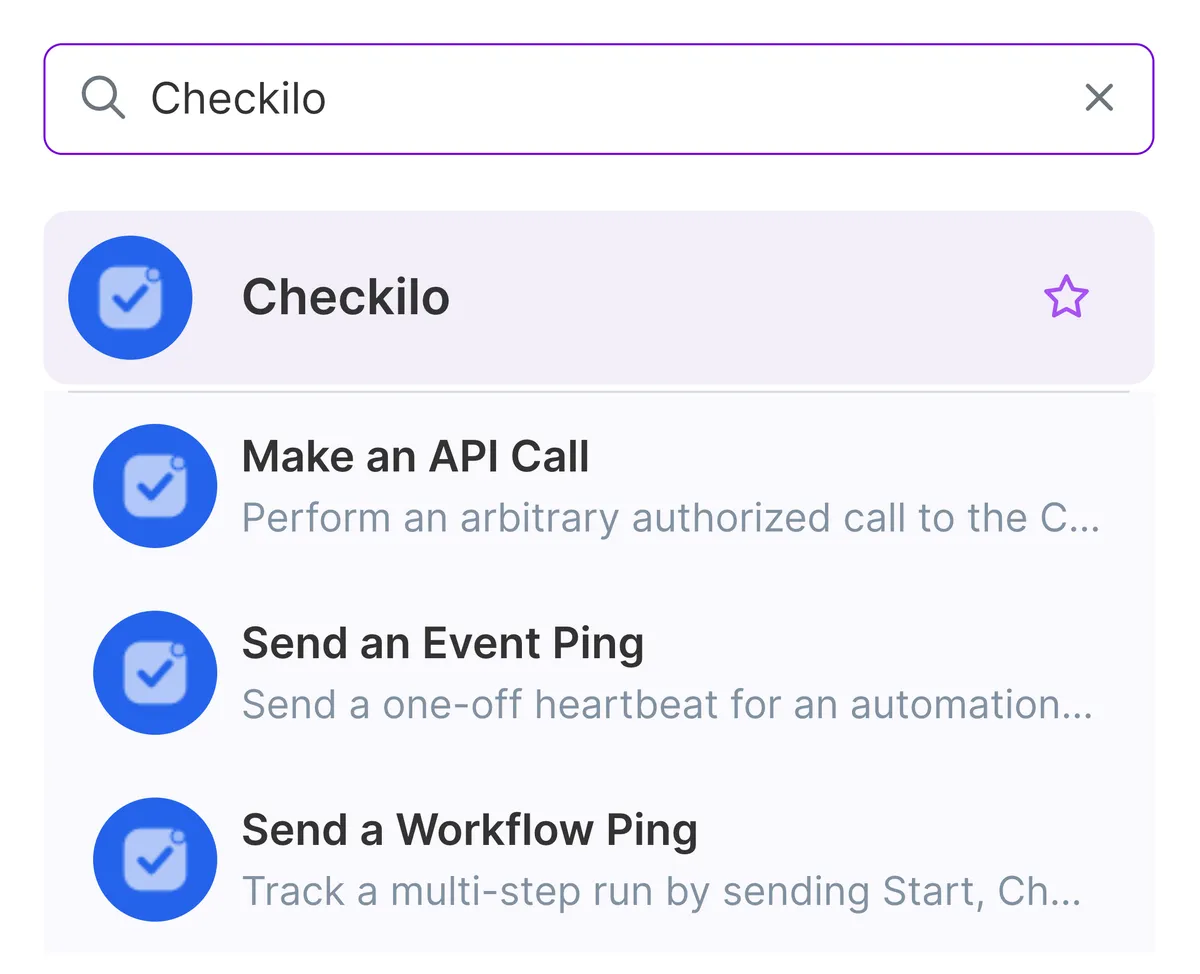
In your scenario, click the plus to add a module and search Checkilo. Pick the operation you need: Send an Event Ping for a single heartbeat, or Send a Workflow Ping to track Start, Checkpoint, and Finish across a multi-step run.
First time, then per module
Connect and configure
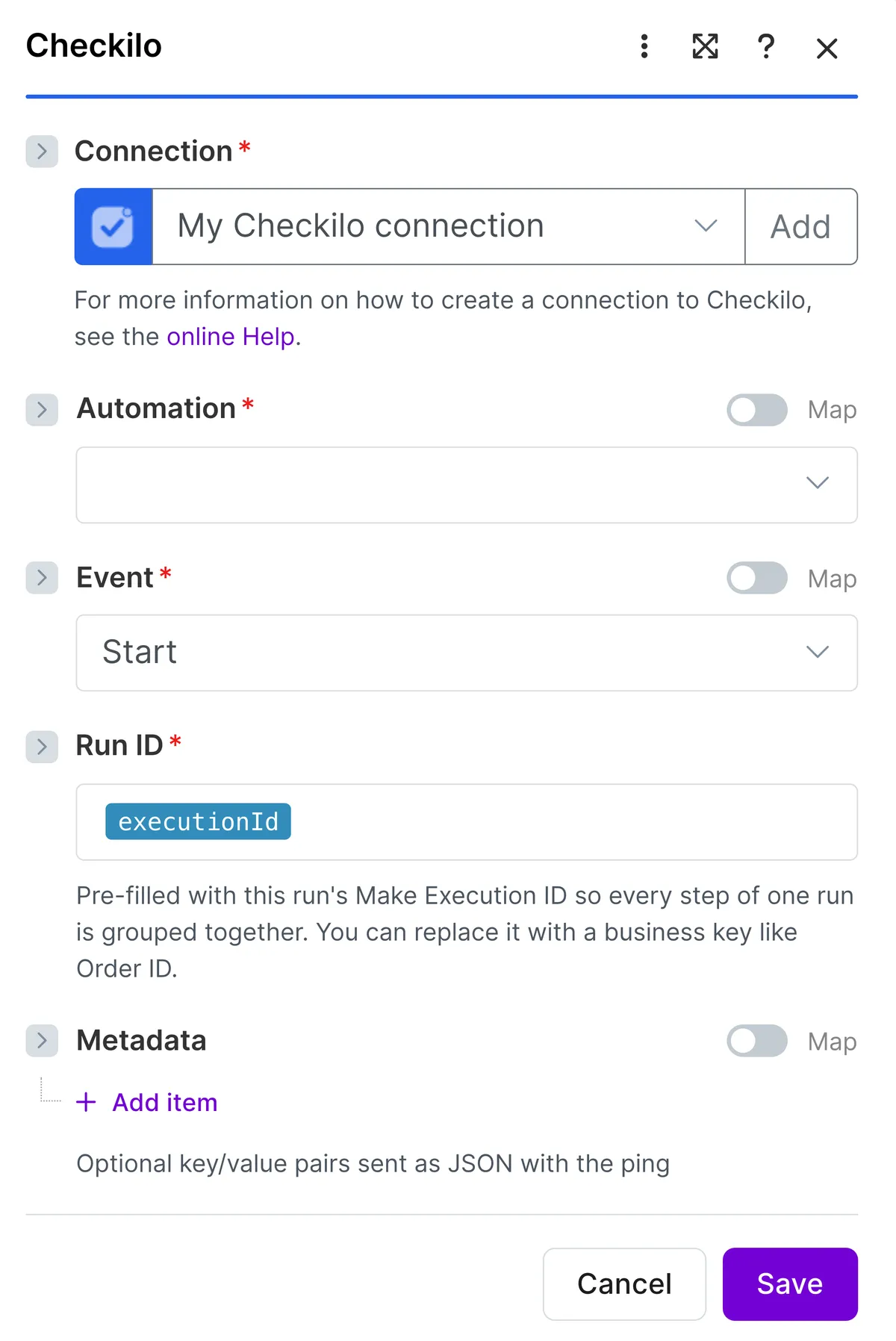
The first time, create a connection and paste your API key; Make verifies it automatically. Then pick your automation from the dropdown, loaded live from your account, and set the event. Add optional metadata rows. Create a key in your Checkilo dashboard after you sign up.
Run ID pre-fills from Make's Execution ID, so every step of one run groups itself. There is no ping URL to paste.
Only automations set to Require API key appear in the dropdown. Turn it on for the automation you want to watch.
Published on Make and pending review: install from the invite link for now, and it moves to Make's app search once verified. Either way, the universal HTTP module always works.
Common questions
Before you let a scenario run unwatched.
Does Make alert you when a scenario stops running?
Only when a scenario runs and a module errors. If the scenario is switched off, a connection expires, or a trigger stops firing, nothing runs, so Make has no execution to flag. That silent stop is what Checkilo watches: it expects a heartbeat from your scenario and tells you the moment one doesn't arrive.
How do I get notified when a Make scenario fails?
Add the Checkilo module to the scenario and it sends a heartbeat as each run passes through. When a run fails, times out, or never arrives, Checkilo alerts you in Slack, email, Discord, Telegram, LINE, Teams, or a webhook, and names the last checkpoint the run reached, so you know which module to open instead of scrolling the history.
Do I need code to monitor Make?
No. Checkilo is a native Make module: add it to your scenario, connect your account, pick the automation and the event, and it's watching. There's no ping URL to paste. The Make app is published and awaiting Make's review, so for now you install it from an invite link; a plain HTTP module works too if you prefer.
Is Checkilo free for Make?
Yes. Free watches 5 automations with no card, and the Make module is included, nothing extra to buy. Outgrow five and Pro is $19 a month for 50 automations. Every alert channel, from Slack and email to Teams and webhook, is on every plan, Free included.
Start watching your Make scenarios.
Free for 5 automations, no card. Install the module, pick an automation, and your first run appears on the timeline.